Tile Actions
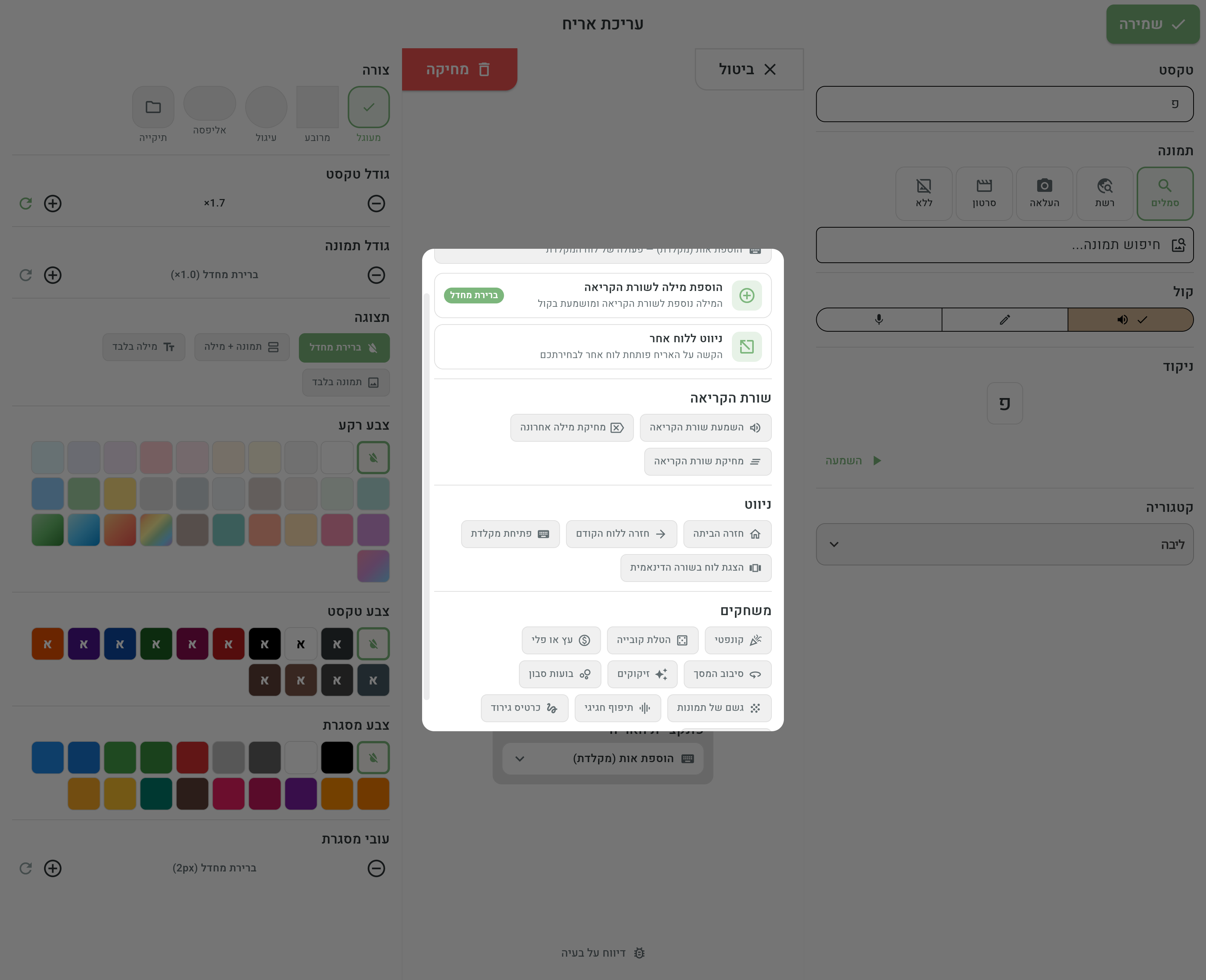
A tile is not just a word — it's a button, and you decide what it does. In the tile editor, tapping the Tile function selector (next to the live preview) opens the list of actions. The two main functions — Add the word to the reading line and Go to another board — come first, as large cards; below them are the rest of the actions, organized in groups: reading line, navigation and games.
The default: add the word to the reading line
The regular action of every new tile is Add the word to the reading line — the word is added to the reading line and spoken aloud. That's how sentences are built, word by word. For the reading line itself see The reading line, and for exactly what plays on tap — The tile voice.
Go to another board
The second main function: tapping the tile opens another board. After picking the action, the Choose a target board dialog opens — search for and pick an existing board, or tap Create a new board and create the target board on the spot, without leaving the editor. The list is grouped into categories like the home screen — "My boards", boards received from professionals, "Emorli boards", "Special boards" and "Template boards" — so navigation can target the built-in boards and boards you received, not only boards you created.
Two switches for navigation tiles
The target-board dialog has two switches:
- Also speak the word — the tile both speaks its word (and adds it to the reading line) and navigates. For example, a “food” tile that says “food” and then opens the foods board.
- Return automatically after one tap — after picking one word on the target board, you return automatically to the board you came from. Perfect for category boards: enter “feelings”, pick “happy”, and come right back to the main board to continue the sentence.
Changing an existing navigation setup
There's no need to set everything up again to change a navigation tile. The Go to another board card in the function selector shows the name of the current target board, and tapping it opens the settings dialog in its current state: the target board is highlighted in the list, and the two switches are set as configured. Every change — switching the board or flipping a switch — takes effect immediately, even if you simply close the dialog; save the tile as usual when you're done.
It's customary to give navigation tiles the Folder shape — so you can see at a glance which tiles are words and which open another board. See Tile appearance.
The reading line group
Three actions that give control over the sentence being built, right from the board:
- Play the reading line — reads the whole accumulated sentence, from start to finish.
- Delete the last word — deletes only the last word that was added.
- Clear the reading line — clears the whole line to start a new sentence.
Tiles like these are especially useful on boards for users who are more comfortable with big buttons inside the board than with the small buttons on the reading line itself.
The navigation group
More actions that turn a collection of boards into a complete communication system:
- Back to home — jumps straight to the home board, from any navigation depth.
- Back to the previous board — one step back, to the board you came from.
- Open the keyboard — opens the Hebrew letter keyboard, for freely spelling words that have no tile. See The keyboard.
- Show a board in the dynamic row — instead of moving to another board, the target board's words are loaded into the current board's dynamic row. You stay on the same board, and the context of the conversation isn't lost.
The games group
Ten effects that appear over the whole screen — moments of joy, reward and motivation right inside the board:
- Confetti — a shower of colorful confetti.
- Dice roll — a die rolls and lands on a random number.
- Heads or tails — a coin toss.
- Screen spin — the screen spins and shakes.
- Fireworks — a fireworks show.
- Soap bubbles — bubbles that float and pop when tapped.
- Picture rain — a shower of small symbols falls across the screen.
- Drumroll — a suspenseful drumroll leading up to an announcement.
- Scratch card — a silver cover you scratch with a finger to reveal the tile's image underneath.
- Surprise timer — a short countdown that opens up to reveal the tile's image — great for practicing waiting.
Game tiles are excellent as a reward at the end of a task, as a release break in the middle of a session, or just for fun. The effects are momentary only: they pass over the screen and disappear — they never touch the reading line and don't change anything on the board.
The built-in keyboard board also has dedicated actions — Add a letter (keyboard) and Delete the last letter. They belong to the keyboard only and are not available on regular tiles. See The keyboard.
How to change a tile's action
- In the board editor, tap the tile to open the tile editor.
- Tap the Tile function selector.
- Pick an action — and if it's a navigation action, pick a target board too.
- Save. From now on, in use mode, tapping the tile triggers the new action.