
Welcome to the Emorli Guide
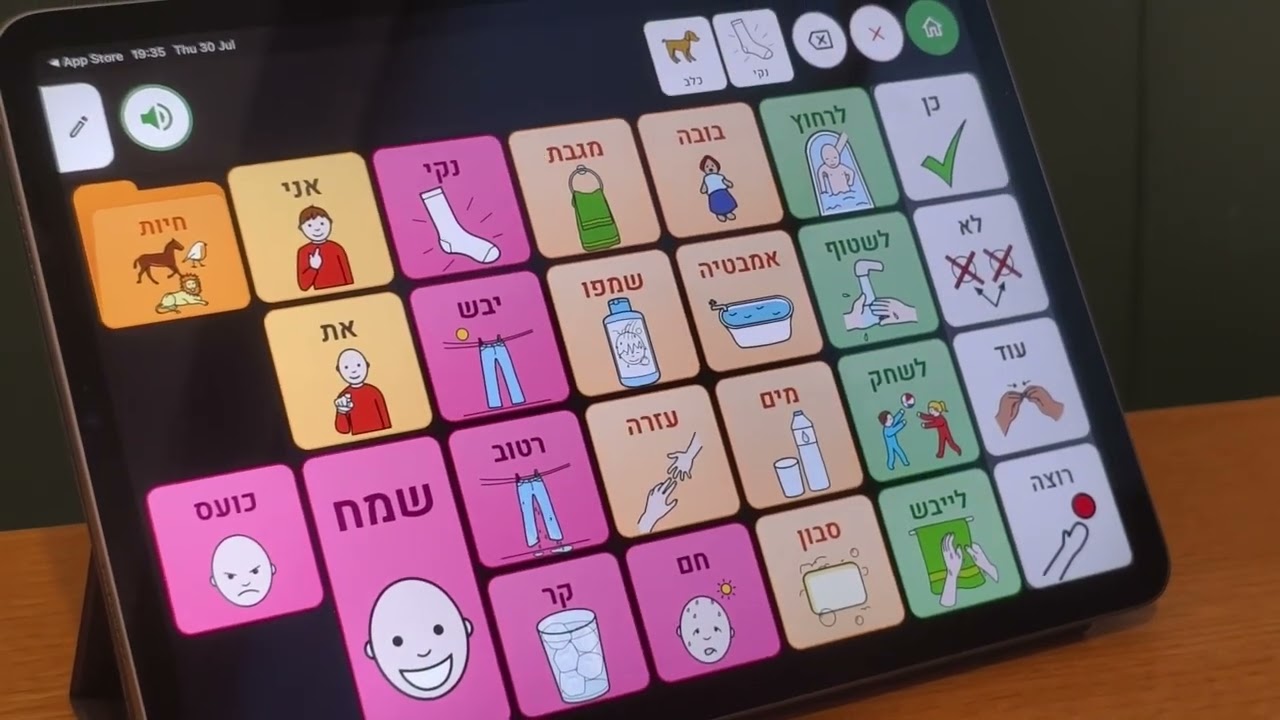
Emorli is a Hebrew AAC (Augmentative and Alternative Communication) board app — a tool that helps children and adults who have difficulty speaking communicate by tapping tiles of words and pictures. The app is designed for parents, speech-language pathologists, education teams — and for the users themselves.
This guide explains, step by step, everything you can do in the app. You can read it in order, jump straight to the topic you're interested in through the menu (☰ at the top), or use the search box.
Prefer reading? Start with the Quick Start — a short path that takes you from installing the app all the way to your first board.
Main topics
Creating and editing
- Creating a board — three ways to create a board: with AI, from scratch, or from a template.
- Editing a board — adding and moving tiles, undoing actions, smart chat editing, and more.
- Editing a tile — everything you can change on a tile: picture, voice, nikud, appearance, and special actions.
Everyday use
- Using a board — communication mode: tapping tiles, moving between boards, and locking editing.
- The reading line — building a whole sentence and playing it with one tap.
- Dynamic row — a changing row of words that follows the topic of conversation.
- The home screen — your board library: searching, arranging, duplicating, and deleting.
Working together
- Sharing and collaboration — how professionals send boards straight to their patients' devices.
- Syncing between devices — your boards are available on all your devices, automatically.
Account and settings
- Settings — profile, display, speech, lock code, and more.
- Accessibility — high contrast, size adjustments, speech rate, and more.
- License and devices — managing the devices linked to your account, and the difference between unlinking a device and signing out.
Help
- FAQ and troubleshooting — quick answers to common questions, and what to do when something doesn't work.
Emorli was built for Hebrew from the ground up — right to left, with full nikud (Hebrew vowel marks) and Hebrew speech — and it's also available in English and Arabic. You pick the interface language in Settings.